Black Friday + Cyber Monday Special! New customers get 30% off their first month with code FLASH30 at checkout.

Emergency text alert system

Get crucial details out instantly when there’s no time to lose with our mass text alert system.

  • Let your staff and customers know the plan in an emergency
  • Communicate last-minute changes
  • Promote event and community safety

No credit card required

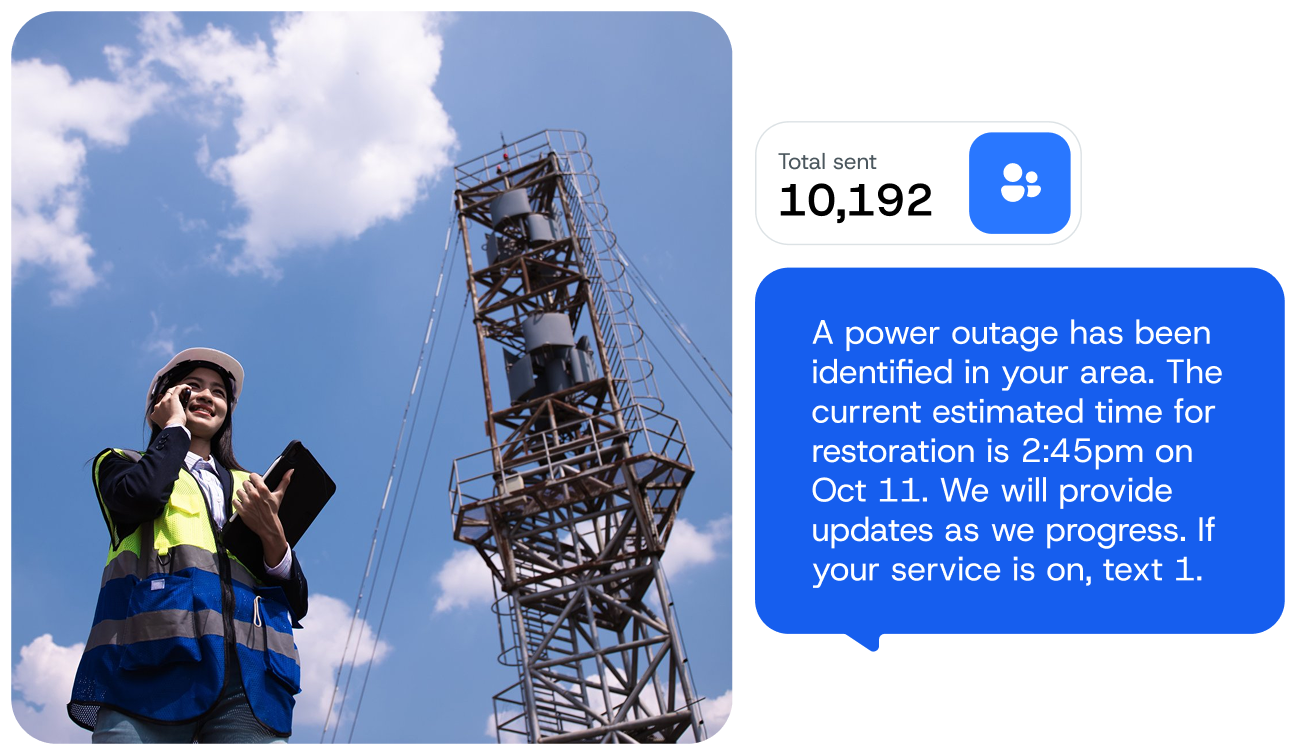
A photo of two utility technicians working. A message sits on top of the photo that has been sent from an emergency text alert system. It reads, "A power outage has been identified in your area. The current estimated time for restoration is 02:45PM on Oct 11. We will provide updates as we progress. If your service is on, Text 1."

What is a text alert system?

A text alert system is software that enables business owners or organization management to send important alerts and updates with SMS.

Whether it’s an emergency or just a quick reminder, texting ensures that everyone on your list gets the message in a timely manner.

Why should you use our text alert system?

Now that you know how to use a text alert service, the question is, what’s in it for your organization?

1. You can add multiple users.

With SimpleTexting, you can add multiple members of your team onto one account so you don’t have to handle your SMS efforts alone. You can even set individual levels of access for each member.

2. You can send mass texts or have one-on-one conversations.

SimpleTexting is an all-in-one texting platform, which means you have the option to send mass text messages to most or all of your subscribers and to handle two-way conversations through your inbox.

3. You can schedule alerts in advance.

Already know what text alerts you need to send? Write your message, choose the list you want to send it to, and schedule it for later.

What should you send through a mass text alert system?

While use cases vary from one organization to another, here are some common use cases we’ve seen in businesses and nonprofits.

When an event is canceled or an unplanned closure happens, your audience is going to want to know. Fire off a fast mass text to give your subscribers a heads-up, and don’t forget to include any details they may need, like how long the change will last or whether events will be rescheduled.

This is a good idea when staffing plans change at the last minute, such as when someone calls in sick or assignments change without warning. Let your employees know about the change as soon as possible (and keep an eye on your inbox for incoming questions).

Text alerts don’t always have to herald disaster. Send out an alert when a planned event is coming up to make sure your attendance list stays full.

Texts can also help you keep your locations safe. You can hang fliers with a text-to-join keyword that encourage staff or visitors to text a specific word to your number to report issues or suspicious behavior.
If you accept reservations, you can have your visitors set their reservations up on your site, and confirm those reservations by text confirmation.
Send out appointment or event reminders to your subscribers ahead of scheduled occasions. Aim for one reminder a week before and another 24 hours before to reduce no-shows.
If your event is coming up and you’re still a few hands short, send out a link to your scheduling site and encourage your subscribers to sign up for a shift. You can even encourage them to respond back with any questions they may have.
When one of your contacts takes an action on your site or regarding your organization (like booking a reservation, shift spot, or appointment), let them know that you’ve registered that action with a confirmation text. This helps everyone stay on the same page.

Power or service outages are a pain, but they happen. When they do, let your customers, staff, or colleagues know with a quick alert text. Let them know what’s happened, how long it’s expected to last, and which backup plans are in place.

Image of a phone with a text sent from our emergency text alert system. The text reads, "Boil Water Notice in effect for the City of Houston until further notice. Individuals without power to boil water are advised to use bottled water for consumption." Behind the phone is a screen grab from SimpleTexting's app showing you can send an emergency text to a list of contacts.

How to use a text alert service

You can easily start up your own text alert system in three easy steps. Here’s how it’s done.

1. Grow or upload a contact list

Import an existing list of contacts into your SimpleTexting account as a CSV or Excel spreadsheet. You can also choose an opt-in method to gather text subscribers.

2. Create your text alert message

Write out your message and include any necessary links using the link shortener.

3. Send your message or schedule it

When you’re ready, send your message immediately or schedule it for a set date and time in the future.

Text alert system FAQs

If you’ve still got questions about running a text alert system, we don’t blame you. Here are a few common questions we’ve heard.

A text alert system is a way for you to get important information out to your SMS contacts over a text message, simple as that.
While you can set up a free text alert system using sites like Textfree or Send SMS Now, you do need to be careful. Those sites can often lack important security features and you may be limited in the type or number of texts you can send. It’s always worth looking for a paid platform that fits your budget.
You can set up text alerts easily in your SimpleTexting account through the Campaigns tab (in the case of mass texts) or the inbox (if it’s a one-on-one alert).
Luckily, SimpleTexting has an iPhone app so you can follow the very same processes on your iPhone as you do on your desktop.
You can set up mass text messaging through your Campaigns tab by starting a new campaign, writing out your message, and choosing which contact list will receive it, then sending it immediately, scheduling it for the future, or setting it as recurring.