Definitions
Inbound Text Service for Business
Think texts are only useful for one-way promotions? Think again! Here’s how you can use SimpleTexting to receive inbound SMS and have two-way conversations.

Do you want people to be able to text your business? You’re not alone. In our 2020 Text Marketing Report, we asked 400 business owners if they plan to increase their budget for text marketing. Over 60% said yes.
It makes sense. People aren’t replying to emails as much anymore. And as for phone calls? We don’t have to tell you that being stuck on hold is no fun.
Our survey also found that over 45% of consumers think it’s useful to be able to text businesses back. Of that group, 40% say they’re more likely to do business with brands that offer the option to text.
So how do you get started with an inbound text service?
In this article, we’ll break it down. We’ll explain how it works, different ways you can use it, the features you should take advantage of, and more.
What is Inbound SMS?
Inbound SMS lets you hold conversations by text message. These conversations can be with leads, existing customers, employees, fans, you name it. The name “inbound” refers to the fact that the user can initiate the conversation with your business—a capability not all text marketing platforms offer.
Everyone has a cellphone, and every cellphone can receive texts, which is why texting has become such a popular channel.
The important thing is to pick a platform with outbound and inbound SMS capabilities.
In other words, you need to be able to receive and reply to messages. SimpleTexting does both.
With an inbound text service, you can:
- Field customer service requests
- Host Text to Vote Polls and Text to Win Contests
- Gather emails, phone numbers, names, and more
- Receive and schedule appointment requests
- Give customers the option to place orders by text
- Get feedback on your products and services
- Collect votes from employees or customers
- Send automated replies
- And more!
Essential Inbound SMS Features Your Business Needs
If you already send text messages to customers, it’s best practice to allow responses from that same channel. If you’re new to text marketing however, here are some ways two-way text communication can benefit your business and its bottom line.
Manage Conversations from One Inbox
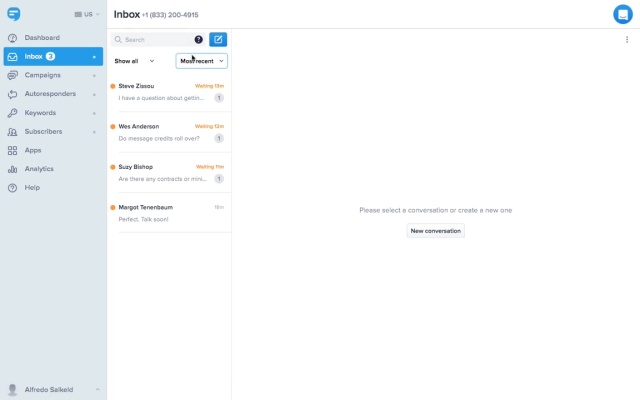
Inbound SMS isn’t like your everyday cellphone. Text marketing software gives you access to smarter inboxes that can sort conversations, allow annotations, mark conversations as resolved, or snooze them for later.
Set Up Text-to-Join Keywords
An SMS keyword is a word or phrase that your customers can text to a 10-digit number or designated text short code. People can text in a keyword for a lot of different reasons. Some of the most common are to receive marketing deals, get more information from your organization, or to sign up for time-sensitive alerts.

Collect and Store information
With data collection, people can share information with your business in order to receive a more personalized experience. Collect information like names, addresses, emails, and product preferences to use later on. Simple acts of message personalization can go a long way with customers. We conducted a study with over 100 accounts, and the average click-through rate (CTR) for messages including their first name was 71%. That’s about 20% higher than non-customized messages CTRs!
Upload Existing Contacts
A list of phone numbers who have given you permission to text them is worth its weight in gold. Be sure to find a text marketing provider that can easily upload your existing list from a spreadsheet right into your contact list.

Set Up Automated Messages
Whether you want to schedule a single message or create a full-length drip campaign, automation helps you save time. Want to capture leads as soon as they reach out? No problem. Automated responses can follow up with a text message before they slip away.

Click-to-Text Capabilities
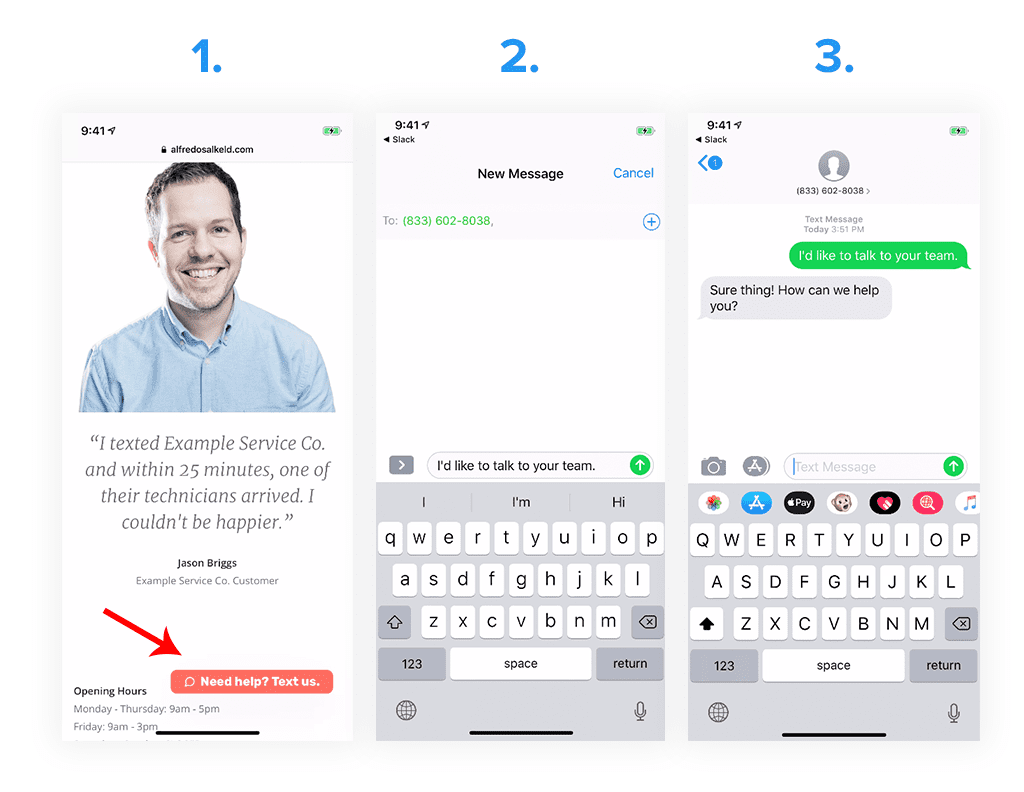
Make starting a new conversation as easy as tapping a button. Click-to-text buttons prefill the message and phone number fields for you. All a customer has to do is click and the SMS app on their cellphone will launch with a pre-written message to your business.
FAQs About Our Inbound Text Service
We’ve covered the basic things you should look for as you search for the right inbound SMS service. You may still have some questions, so we’ve got some answers.
All incoming SMS messages are free. Messages with media attached are MMS and cost 1 credit each. Our plans start at $29 per month for 500 credits and scale up from there depending on how many messages you plan to send.
Yes! From your inbox you can upload files and send them as links within the body of your message. Share photos, audio files, videos or PDFs with your contacts.
Absolutely. With our iOS and Android app you can access your full inbound text service just as you would on a desktop.
You can set up push notifications on your phone or desktop. You can also set up forwarding to your email.


