Advanced Tips
How Does SMS Billing Work?
We break down how SMS billing works and how to choose the best method for your business.

Anyone who has been told “the check is in the mail” or “time is money” knows that faster is better when it comes to getting paid.
This is a big reason mobile payments are in the spotlight. Customers don’t want to deal with a complicated multi-step payment process anymore and businesses want to get paid on time.
Want to know how to set up a billing system that helps your customers send payments quickly and easily? Let us introduce you to SMS payments.
What Is SMS Billing?
SMS billing is a way to take customer payments through a text conversation. Instead of back-and-forth emails or complicated website navigation, text-to-pay lets you and your customers complete transactions with just a few clicks.
How To Set Up SMS Billing
Businesses generally set up SMS billing in one of three ways: text commands, SMS invoices, or payment links.
Text Commands
SMS billing using text commands involves sending a text message to your customer with a special keyword when you’re ready for payment. The customer then replies with the keyword to send the amount through.
This method allows customers to set up a card in advance, and their text triggers a charge each time payment is due after that.
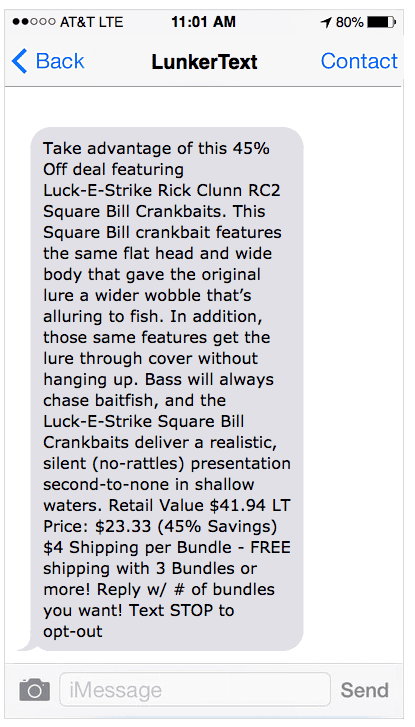
Our customer, LunkerText, applies this approach. (They created this automated flow using our API.)
You sign up for the service by providing your email, phone number, address, apparel sizes, and billing details. You get a daily deal and can then respond with the number of units you’d like.

Once someone signs up, they send customers daily offers like this with a call to action to respond with the number of units.
Invoices
An SMS invoice is a more traditional way to take payment. You attach a customer’s invoice to your text message (as an image in an MMS message or a PDF). Then you simply include a link where they can go to finish their payment online.
Customers often appreciate having their invoices right in their text history because it’s more accessible than searching through their cluttered email inbox.
Payment Links
This method is exactly what it sounds like. When you send your customer a notice that their payment is due, you add a secure payment link into your message that they can click on to complete their payment.
Now that you’re familiar with some of the details of how SMS payments work, we’ll give you a few handy templates to get you started.
Text-to-Pay
Text-to-pay is one of the most efficient ways to receive payment from customers and clients. Instead of a payment link, your contact will receive a text message asking to confirm if they’d like to make a payment of X amount.
When the contact responds ‘yes’, the transaction will be completed.
With text-to-pay, there’s no need for the contact to add their card details or payment information every time. Instead, the business can use the information it has on file once a transaction has been completed, and use this for any repeat payments.
SMS Billing Templates
Use these templates to set up your own SMS payment messages for every step of the process.
Easy Billing for Customers
Including your customer’s invoice and a payment link in the same message gives them all the information they need in one message. This cuts down on long conversations with lots of questions.
Payment Reminder SMS
“I forgot” is one of the most common reasons for late payments. Sending a clear, firm payment reminder cuts down on delays.
Confirmation Message
Finish transactions off with a confirmation message that lets customers know their payment went through successfully. Make sure you attach a receipt for their records.
The Wrap On Using SMS Billing
Mobile payment solutions have seen major growth in the last few years, and there’s good reason. Customers prefer handling all their most important tasks from their phones.
That trend means that it’s crucial for businesses to start making things like accepting payments for services possible within one text conversation.
To add to the convenience factor, mobile payment processing is more secure than ever, meaning that text message payments have a bright future.
The good news for you, the business owner, is that SMS payments are easy to set up with SimpleTexting. Give us a try and get 14 days of full access to our features, no credit card required.