Black Friday + Cyber Monday Special! New customers get 30% off their first month with code FLASH30 at checkout.

Templates & duplicates

Rewriting the same message over and over again can be tedious. With our templates feature and the ability to duplicate campaigns, you don’t have to!

No credit card required

Create message templates

Save time by reusing your frequently sent messages, campaigns, inbox replies, autoresponders, and keyword confirmation messages.

To use the template feature, just look out for the bookmark symbol.
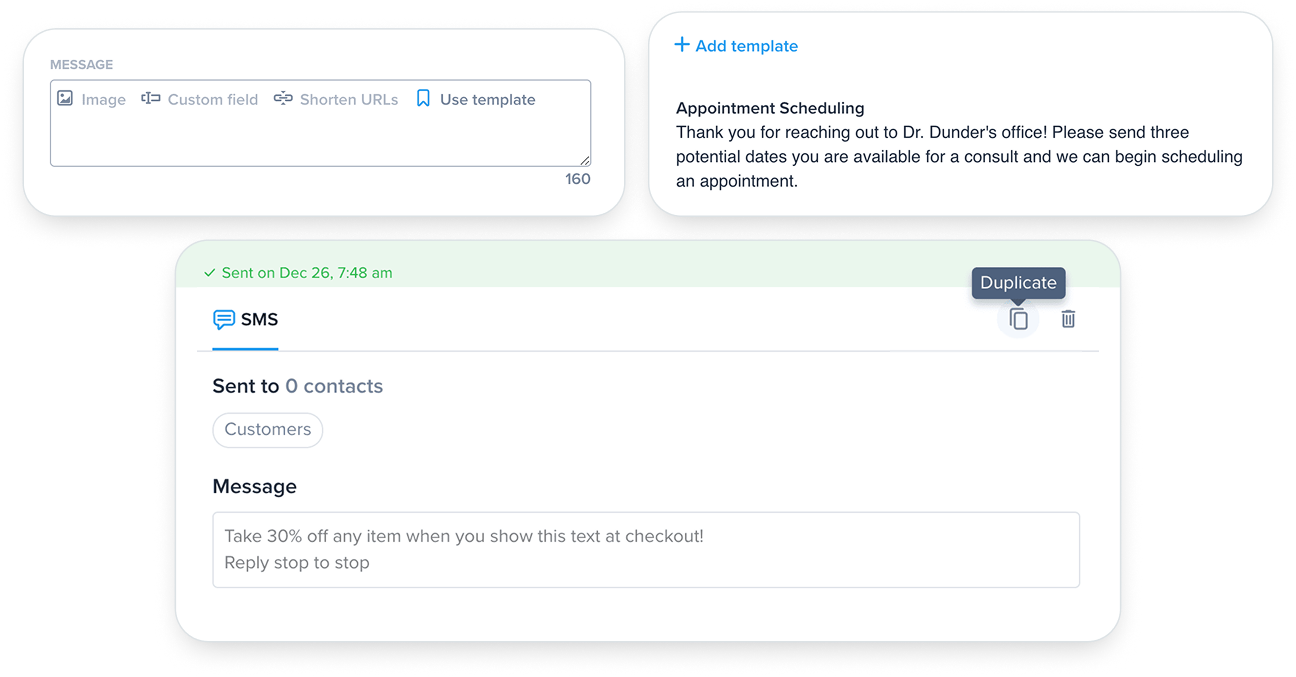
The Use template button in the SimpleTexting message composer

Pick a template or add a new one

From here you can add a new template or choose one you’ve already created. Click the template you’d like to use and the text will immediately autofill into the message. Now you’re ready to send your message right away or schedule it for later.

Templates live in their category

Just remember, each template you create will live in the category it was created in. An autoresponder template, for example, will only show up when you create a new autoresponder.

Looking for more? For a deeper dive into getting started with the templates check out this help desk article.

Duplicate previously sent campaigns

You also have the option to duplicate a previously sent campaign. Simply open the campaign you wish to duplicate and look for the copy symbol on the far right. From there give the campaign a new name (ex. Summer Sale Duplicate) and proceed just as you would when sending any other campaign!